


Membership Policy
PawChamp offers PawChamp Membership that is a subscription-based product through which you will be automatically renewed unless and until you cancel. The following terms apply to all purchases you make through PawChamp.
In case of any inconsistency or conflict regarding billing, charges, and payment terms, this Membership Policy prevails over our general Terms of Use.
1. Membership
Your membership renews automatically at the end of each membership period (e.g., weekly, monthly, 6‑monthly, annual, or other option selected by you at the time of purchase) unless and until you cancel. You will be charged the amount stated at checkout, plus any applicable taxes and fees.
The specific membership options available to you may vary by country, state, or region.
2. Payment method
Payment will be charged to the payment method you submitted at the time of purchase at confirmation of purchase.
By purchasing membership, you authorize us to charge all applicable membership fees and taxes to the payment method you use, including for recurring renewals until you cancel.
You acknowledge that you must cancel your membership using the cancellation method stated below to stop future automatic charges.
3. Cancellation
To cancel your membership, follow the instructions below for your purchase method. Canceling your membership disables automatic renewal, but you will retain access to your membership features until the end of your then-current membership period.
Your membership renews automatically at the end of each period until you cancel.
Your membership is considered cancelled once we (or the relevant app store) process your cancellation request and send you a confirmation (for example, by email or an in-app confirmation screen).
The exact cancellation flow, wording, and screens in the app or on the website may change from time to time as we improve our user experience and may differ depending on your country, state, or region. Where legally permitted, certain membership plan information or cancellation entry points may be displayed differently or grouped under different menu items.
Cannot Find Your Membership? If you do not see an active PawChamp membership but have been charged, contact our support team at [email protected]. Please include a screenshot of the transaction if possible.
⚠ Important Warning: Uninstalling the PawChamp app does NOT cancel your membership. Automatic charges will continue, and you will still have access to PawChamp through your browser. You must follow the cancellation steps below to stop future charges.
3.1. If you purchased a membership or enabled a trial on the App Store
You may cancel PawChamp membership anytime by turning off auto-renewal through your Apple ID account settings. To avoid being charged, cancel the in-app subscription in your Apple ID account settings at least 24 hours before the end of the free trial or the current membership period. You alone can manage your in-app subscription. Learn more about managing in-app purchases (and how to cancel them) on Apple support page.
Note: PawChamp does not control Apple’s policies.
3.2. If you purchased a membership or enabled trial on Google Play:
You may cancel a free trial or a in-app subscription anytime by turning off auto-renewal through your Google Play account settings. To avoid being charged, cancel the in-app subscription in your account settings before the renewal date. You alone can manage your in-app subscriptions. Learn more about managing in-app purchases (and how to cancel them) on Google Play support page.
Note: PawChamp does not control Google Play’s policies.
3.3. If you purchased PawChamp membership on our website:
If you enrolled in PawChamp membership on our website, you can cancel the membership by managing your membership status in your account settings or by contacting our support team at [email protected]. You must cancel before the end of the then-current membership period to avoid being automatically renewed and charged for the next membership term.
You may cancel using one of the options below:
(a) Via your account settings
Where available, you can cancel as follows:
Go to Profile & Settings in your PawChamp account.
Open Membership Info (or a similarly named section where membership details are displayed).
Select Turn off autorenewal (or equivalent control).
Confirm Cancel Membership.
You may see a sequence of screens such as: Settings & Profile → Manage Membership → Cancel Membership → Success/Confirmation screen (exact wording and design may vary over time and by jurisdiction).
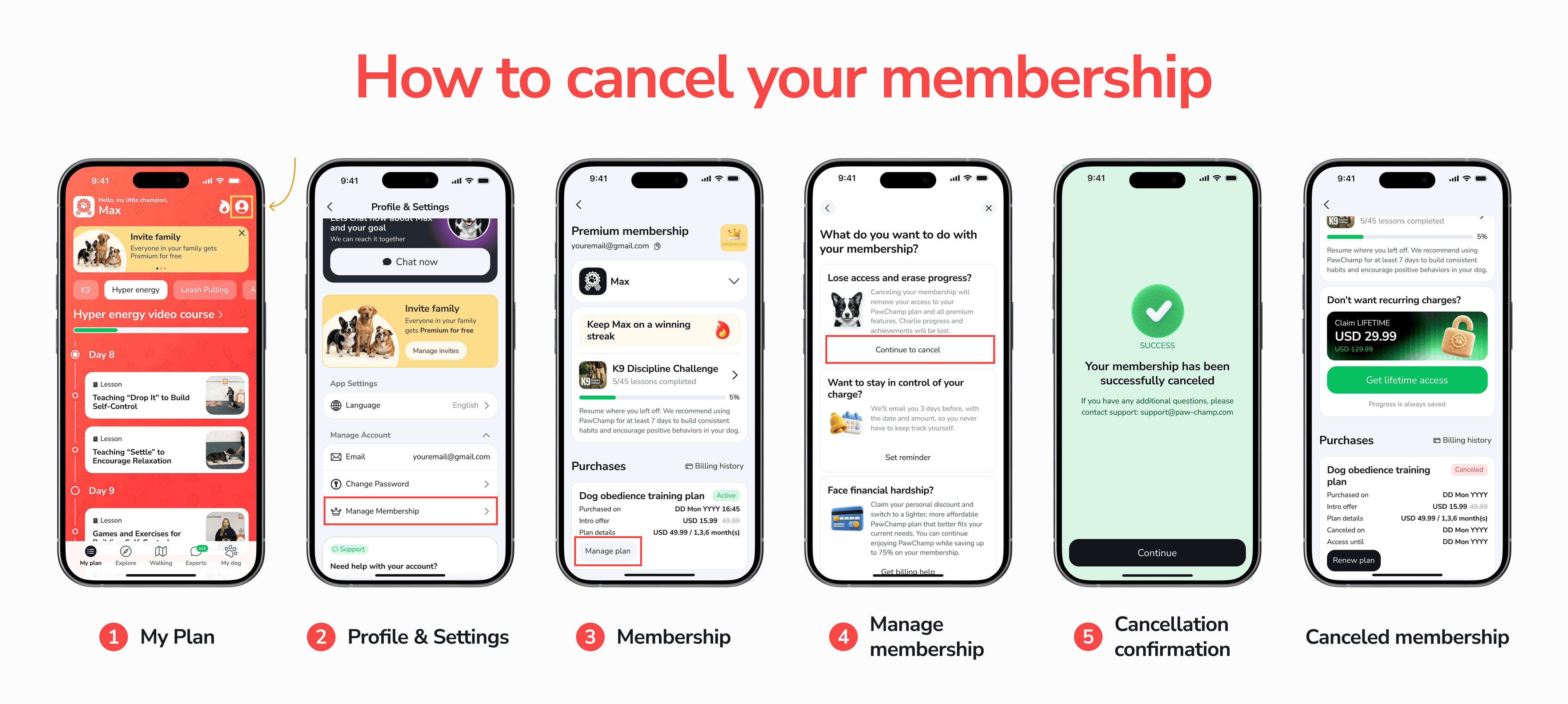
(b) Via email to our support
You can request cancellation by emailing us at [email protected] from the email address associated with your PawChamp account and used to purchase the membership.
To help us process your request automatically and as quickly as possible:
Use “Unsubscribe” as the email subject line.
In the email body, clearly state that you wish to cancel your membership and include the email address used to create your account and purchase the membership (if different from the sending address).
If the email is sent from the same email address that is registered on your account and used for the purchase, your request is typically processed automatically, and a cancellation confirmation email should be delivered within a few minutes.
If the email address you write from differs from the email used for the membership, a support agent will review your request, help locate the correct account, and may contact you for additional information to ensure that the correct membership is cancelled.
Example email flow may include:
A sample support reply confirming cancellation.
A system-generated email confirming that the membership has been cancelled with the following text:
(c) Via chat on our website or in the app
You may also request cancellation via our online support expert chats available on the website and/or in the app.
If you contact us while logged in, we will use your account information to identify your membership.
If you contact us without being logged in, you will need to provide the email address used to create your account and purchase the membership.
4. Refunds
Purchases made on the PawChamp website are generally non-refundable. If you cancel your membership, you'll keep full access to your features for the rest of your current billing period — refunds simply aren't issued for that remaining time.
That said, we're happy to consider refunds on a case-by-case basis, at our discretion and in line with applicable law and our policies, which may be updated from time to time.
You acknowledge that purchases made through the Apple App Store and Google Play Store are subject to Apple and Google’s refund policies, respectively.
If you purchased a membership or enabled trial via App Store:
If you are eligible for a refund, you'll have to request it directly from Apple. To request a refund, follow these instructions from the Apple support page.
If you purchased a membership or enabled trial via Google Play:
If you are eligible for a refund, you'll have to request it directly from Google. To request a refund, follow these instructions from the Google’s support page.
If you purchased a membership on our websites:
Purchases made on the PawChamp website are generally non-refundable. If you cancel your membership, you'll keep full access to your features for the rest of your current billing period — refunds simply aren't issued for that remaining time.
That said, we're happy to consider refunds on a case-by-case basis, at our discretion and in line with applicable law and our policies, which may be updated from time to time.
If you have any questions in relation to the membership terms or refund eligibility, please contact us at [email protected].
5. Changes to Membership Fees and Terms
To the maximum extent permitted by applicable law, we may change membership fees and other membership terms at any time. We will provide reasonable notice of pricing changes by posting the new prices in the app and/or on the website, and/or by sending you an email or other prominent notice.
If you do not wish to pay the new fees or accept the updated membership terms, you can cancel your membership before the changes take effect.
If you have any questions about these membership terms, please contact us via the in-app or website chat, or email us at [email protected].
Last updated: 06 August 2026
Translations 🇺🇸 🇬🇧 🇩🇪 🇪🇸 🇫🇷 🇵🇹 🇮🇹 🇳🇱 🇧🇬 🇨🇿 🇩🇰 🇬🇷 🇫🇮 🇭🇺 🇯🇵 🇳🇴 🇷🇴 🇸🇪
Any translation from the English version is provided for your convenience only. In the event of any difference in meaning, version, or interpretation between the English language version and any translation, the English language version will prevail.